


Let’s be real. If you run an agency, your most valuable resource isn’t creativity—it’s time.
Yet too many of us spend it on tasks that feel important but don’t move the needle: emailing back-and-forth to schedule calls, manually formatting reports, and chasing down client approvals. This isn’t just tedious; it’s expensive.
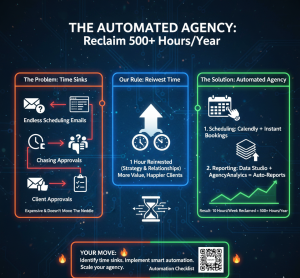
We made a rule: for every hour we save on operations, we reinvest an hour into strategy or client relationships. That rule led us to build what we call The Automated Agency.
By leveraging a specific set of tools for two of our biggest time sinks—scheduling and reporting—we’ve systematically reclaimed over 10 hours per week. That’s an extra 500+ hours per year for higher-value work.
Here’s our exact playbook, including the tools, our setup, and how much time they save.
Part 1: Slaying the Scheduling Dragon (Saves ~6 Hours/Week)
The endless “What time works for you?” loop is a silent killer. Our goal was to make client scheduling 100% self-service.
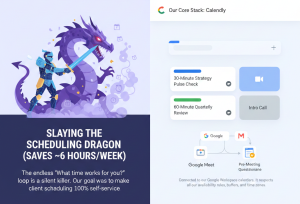
Our Core Stack:
Calendly (for the simplicity win)
-
- What we use it for: All standard client calls, intro calls, and internal meetings.
- The Automation: Connected to our Google Workspace calendars. It respects all our availability rules, buffers, and time zones.
- Pro Setup: We created multiple event types (e.g., “30-Minute Strategy Pulse Check,” “60-Minute Quarterly Review”). Each automatically attaches the relevant Google Meet link and a pre-meeting questionnaire via the integration with…
Typeform
-
-
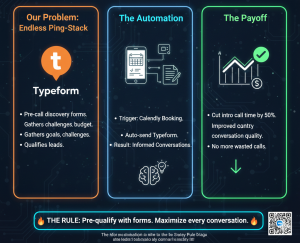
- What we use it for: Pre-call discovery forms.
- The Automation: When a client books a “New Project Discovery” call in Calendly, they are automatically sent a Typeform to complete. This asks about goals, challenges, and budget before we speak. This has cut intro call time by 50% and drastically improved the quality of our conversations.
-
SavvyCal (for high-touch, complex scheduling)
-
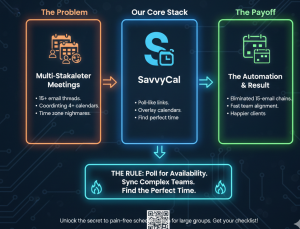
- What we use it for: Multi-stakeholder meetings, team alignment sessions.
- The Difference: SavvyCal lets us send a poll-like link where internal and client teams can overlay their availabilities to find the perfect time. It eliminated the 15-email chain to coordinate 4 calendars.
The Time Saved:
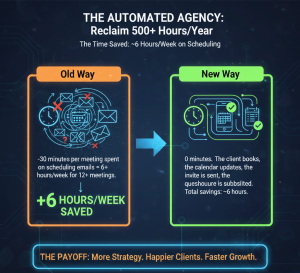
- Old Way: ~30 minutes per meeting spent on scheduling emails = 6+ hours/week for 12+ meetings.
- New Way: 0 minutes. The client books, the calendar updates, the invite is sent, the questionnaire is submitted. Total savings: ~6 hours.
Part 2: Automating the Reporting Grind (Saves ~4+ Hours/Week)
Monthly reporting was a soul-crushing, copy-paste marathon from 8 different platforms into a PowerPoint. No longer.
Our Core Stack:
DashThis (our reporting command center)
-
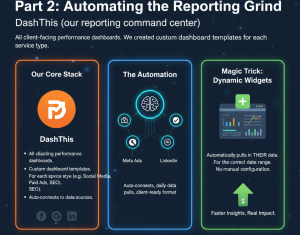
- What we use it for: All client-facing performance dashboards.
- The Automation: We created custom dashboard templates for each service type (e.g., Social Media Management, Paid Ads, SEO). DashThis auto-connects to our data sources (Meta Ads, Google Analytics, LinkedIn, etc.), pulls in the data daily, and displays it in a beautiful, client-ready format.
- Magic Trick: We use Dynamic Widgets. When we add a new client to a template, it automatically pulls in their data for the correct date range. No manual configuration.
Zapier (the glue)
-
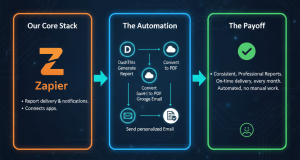
- What we use it for: Report delivery and notifications.
- The Automation: We have a “Zap” that: On the 3rd of each month, triggers DashThis to generate the latest report for Client X > Converts it to a PDF > Saves it to a dedicated Google Drive folder > And then sends a personalized email via Gmail to the client with the PDF link and 2-3 key insights pulled from the dashboard.
- The client receives a consistent, professional report on the same day every month, and we don’t lift a finger.
Google Data Studio / Looker Studio (for deep-dive analytics)
-
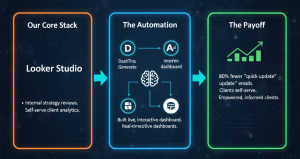
- What we use it for: Internal strategy reviews and clients who love to self-serve.
- The Automation: We built a live, interactive dashboard that updates in real-time. Clients with logins can check KPIs anytime. This has reduced the “Can I get a quick update?” emails by about 80%.
The Time Saved:
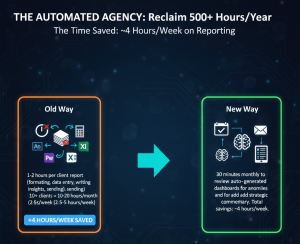
- Old Way: 1-2 hours per client report (formatting, data entry, writing insights, sending) x 10+ clients = 10-20 hours/month (2.5-5 hours/week).
- New Way: 30 minutes monthly to review auto-generated dashboards for anomalies and add strategic commentary. Total savings: ~4 hours/week.
The Golden Rule: Automate, Then Elevate
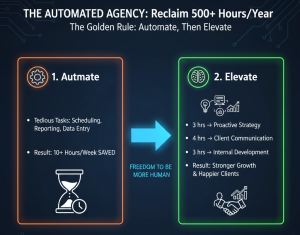
Automation isn’t about replacing human touch; it’s about freeing us to be more human. The 10+ hours we save weekly are now strategically reinvested:
- 3 hours → Proactive Strategy: We now hold monthly “innovation hours” for each client to brainstorm new opportunities, rather than just reporting on the past.
- 4 hours → Client Communication: More check-in calls, voice notes, and strategic emails that build the relationship, not just transact.
- 3 hours → Internal Development: Improving our processes, learning new platforms, and team training.
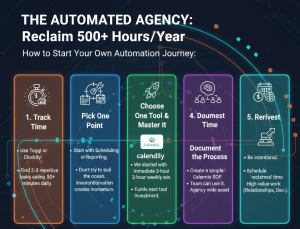
How to Start Your Own Automation Journey:
- Track Your Time for One Week: Use Toggl or Clockify. You’ll likely find 2-3 repetitive tasks eating 30+ minutes daily.
- Pick One Pain Point: Start with either scheduling or reporting. Don’t try to boil the ocean. Mastering one automation creates momentum.
- Choose One Tool and Master It: We started with Calendly. It gave us an immediate 3-hour weekly win that funded our next tool investment.
- Document the Process: Once it works, create a simple SOP so your team can use it. This turns your personal time-saver into an agency-wide asset.
- Reinvest the Time, Don’t Just Bank It: Be intentional. Schedule the “reclaimed” time in your calendar for high-value work before it gets filled by other low-value tasks.
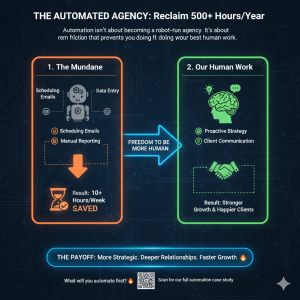
Automation isn’t about becoming a robot-run agency. It’s about removing the friction that prevents you from doing your best, most human work. By letting machines handle the mundane, we’ve not only saved 10+ hours a week—we’ve become a better, more strategic, and more responsive partner to our clients.
The tools are out there. The time is now. What will you automate first?
Curious about a specific setup? Have a tool that saves you hours? Share it below—let’s build the automated agency playbook together.