Archives February 2026

Mastering Micro-Influencers: How to Vetting and Scaling Nano-Influencer Campaigns for Local Markets

Three smartphones displaying nano-influencers promoting local businesses with engagement icons and social media metrics

Mastering Micro-Influencers: How to Vet and Scale Nano-Influencer Campaigns for Local Markets

In the world of digital marketing, bigger isn’t always better. While mega-influencers dominate headlines, a quieter revolution is happening at the local level one that delivers authentic engagement, higher conversion rates, and meaningful community impact. Enter nano-influencers: everyday people with 1,000-10,000 followers who wield surprising power in their hyper-local communities.

Futuristic AI robots showcasing micro-influencers with follower counts, engagement metrics, and growth analytics

Smart tools and data-driven strategies help scale micro and nano-influencer campaigns efficiently.

If you’re looking to connect with local markets in a genuine way, nano-influencer campaigns might be your secret weapon. Here’s how to vet, manage, and scale these campaigns effectively.

Why Nano-Influencers Are Perfect for Local Markets

Local influencer taking a selfie at a farmers market promoting authentic community engagement

Nano-influencers drive stronger local impact through trust, authenticity, and real community connection.

Nano-influencers typically boast:

  • High engagement rates (often 5-10%, compared to 1-2% for larger influencers)
  • Authentic relationships with their audience
  • Specialized knowledge of their local community
  • Cost-effectiveness for brands with smaller budgets
  • Authentic content that feels relatable rather than staged

For local businesses—from coffee shops to boutique fitness studios—these micro-voices can drive more foot traffic and loyalty than any generic ad campaign.


The Vetting Process: Finding the Right Fit

  1. Define Your Campaign Goals

Before you start searching, clarify what you want to achieve:

  • Brand awareness in a specific neighborhood?
  • Event promotion?
  • Product launches targeting local early adopters?

    Two people discussing at a local market event with campaign goals for brand awareness, event promotion, and product launches

    Strong campaigns start with clear goals. Define whether you want local brand awareness, event promotion, or product adoption.

  1. Look Beyond Follower Count

Dig deeper into these key metrics:

  • Engagement rate: Comments, shares, and saves relative to follower count
  • Audience quality: Are followers local? Do they engage meaningfully?
  • Content style: Does their aesthetic and voice align with your brand?
  • Past partnerships: How have they worked with other brands?
Infographic showing engagement rate, audience quality, and content style as key influencer selection metrics

Choosing the right influencer means looking beyond follower numbers and focusing on engagement, audience quality, and content style

  1. Assess Authenticity
  • Check if their followers are real (beware of bought followers)
  • Read through comments to gauge genuine community interaction
  • Look for consistent themes in their content that show true passion
Smartphone showing social media comments with tips to check fake followers and assess genuine influencer engagement

Authenticity beats numbers. Look for real followers, real conversations, and real passion.

  1. Evaluate Professionalism
  • Response time to inquiries
  • Quality of communication
  • Willingness to understand your brand goals
Infographic showing response time, communication quality, and understanding brand goals for influencer professionalism

Professionalism matters when scaling from one influencer to many.

Scaling Your Campaign: From One to Many

Managing multiple nano-influencers might seem daunting, but these strategies can help:

  1. Create a Streamlined Onboarding Process
  • Develop clear brand guidelines specific to nano-influencers
  • Create templates for agreements, briefs, and content submission
  • Set up a simple system for product delivery or service access
Infographic showing onboarding steps for nano-influencers including brand guidelines, templates, and delivery systems

A smooth onboarding process helps nano-influencers create better content, faster.

  1. Leverage Tools for Management
  • Use platforms like Grin, Upfluence, or even tailored Trello boards
  • Create shared calendars for content deadlines
  • Establish a dedicated communication channel (Slack, email group)
Workspace with laptop, Trello board, Slack, calendar, and influencer management tools for campaign coordination

The right tools make managing multiple nano-influencers simple and scalable.

  1. Develop Scalable Content Frameworks
  • Provide creative direction while allowing personal interpretation
  • Create hashtag campaigns that unite individual efforts
  • Develop content templates that maintain brand consistency while encouraging personal touches
Creative team collaborating on scalable content frameworks, hashtag campaigns, and brand-consistent templates

Scale content without losing your brand voice.

  1. Implement Efficient Tracking
  • Use unique discount codes for each influencer
  • Create UTM parameters for link tracking
  • Set up local landing pages to measure geographic impact
Billboard graphic showing influencer tracking with UTM links, discount codes, geographic impact, and ROI growth

Track smarter. Measure local impact. Improve ROI.

Building Lasting Local Relationships

Unlike one-off campaigns with larger influencers, nano-influencer partnerships can evolve into long-term community relationships:

  • Offer exclusivity: Make them feel like true brand ambassadors
  • Provide experiences: Invite them to special events or previews
  • Create a community: Connect your nano-influencers with each other
  • Seek their input: They know their audience best—listen to their insights
Diagram showing influencer network growth from one-off campaigns to community-driven partnerships

Move beyond one-off campaigns and build lasting influencer communities.

Measuring Success Beyond the Numbers

While metrics matter, the true value of nano-influencer campaigns often lies in:

  • Local brand sentiment: Are people talking about you in the community?
  • User-generated content: How much authentic content are you accumulating?
  • Long-term loyalty: Are customers returning and mentioning how they found you?
  • Competitive local positioning: Are you becoming the “neighborhood favorite”?
Illustration showing brand growth metrics like local sentiment, user-generated content, loyalty, and community positioning

True success is more than numbers. Measure sentiment, loyalty, and community impact.

The Future Is Local and Authentic

As consumers increasingly crave authentic connections and community relevance, nano-influencer campaigns offer a powerful way to build genuine local presence. The trust they’ve cultivated with their modest following often translates into higher conversion rates and more meaningful brand relationships.

Woman showing a mobile post in a café with friends, representing authentic local influencer connections and community trust

Local influence builds real trust. Authentic connections drive stronger community impact.

Remember: In the world of nano-influencers, authenticity always outperforms polish. Your willingness to embrace local voices, imperfect content, and genuine relationships will set your brand apart in an increasingly crowded digital landscape.

Ready to go micro? Your most loyal customers might already be talking about you—you just need to find the right amplifiers in your local community.
The Automated Agency: Tools We Use to Save 10+ Hours Per Week on Scheduling and Reporting

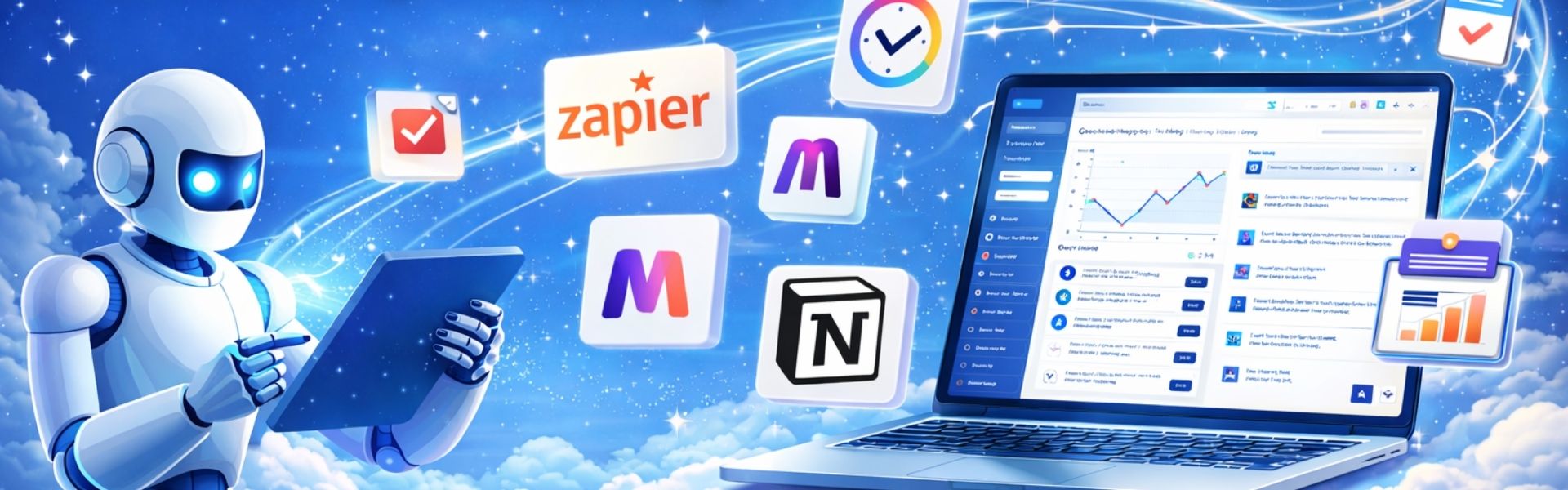
Futuristic illustration of a robot using automation tools connected to a laptop dashboard for scheduling and reporting

Let’s be real. If you run an agency, your most valuable resource isn’t creativity—it’s time.

Yet too many of us spend it on tasks that feel important but don’t move the needle: emailing back-and-forth to schedule calls, manually formatting reports, and chasing down client approvals. This isn’t just tedious; it’s expensive.

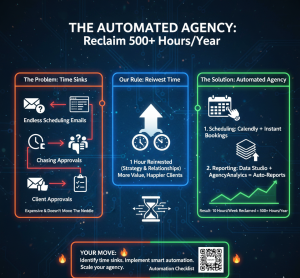
Infographic showing the transition from agency time sinks like endless emails to automated scheduling and reporting solutions.

Moving from manual “time sinks” to an automated agency model can reclaim over 500 hours per year.

We made a rule: for every hour we save on operations, we reinvest an hour into strategy or client relationships. That rule led us to build what we call The Automated Agency.

By leveraging a specific set of tools for two of our biggest time sinks—scheduling and reporting—we’ve systematically reclaimed over 10 hours per week. That’s an extra 500+ hours per year for higher-value work.

Here’s our exact playbook, including the tools, our setup, and how much time they save.

Part 1: Slaying the Scheduling Dragon (Saves ~6 Hours/Week)

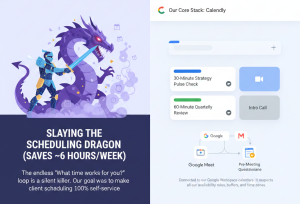
The endless “What time works for you?” loop is a silent killer. Our goal was to make client scheduling 100% self-service.

Illustration of a knight fighting a dragon next to a digital interface showing automated meeting types and integrations.

End the “What time works for you?” loop by making client scheduling 100% self-service.

Our Core Stack:

Calendly (for the simplicity win)

    • What we use it for: All standard client calls, intro calls, and internal meetings.
    • The Automation: Connected to our Google Workspace calendars. It respects all our availability rules, buffers, and time zones.
    • Pro Setup: We created multiple event types (e.g., “30-Minute Strategy Pulse Check,” “60-Minute Quarterly Review”). Each automatically attaches the relevant Google Meet link and a pre-meeting questionnaire via the integration with…

Typeform

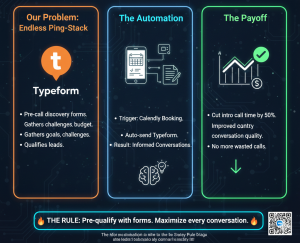
      • What we use it for: Pre-call discovery forms.
      • The Automation: When a client books a “New Project Discovery” call in Calendly, they are automatically sent a Typeform to complete. This asks about goals, challenges, and budget before we speak. This has cut intro call time by 50% and drastically improved the quality of our conversations.
Workflow diagram showing a Calendly booking triggering an automated Typeform for lead qualification.

Automating discovery forms can cut intro call times by 50% while improving conversation quality.

SavvyCal (for high-touch, complex scheduling)

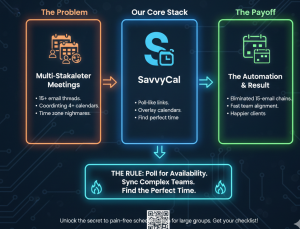
    • What we use it for: Multi-stakeholder meetings, team alignment sessions.
    • The Difference: SavvyCal lets us send a poll-like link where internal and client teams can overlay their availabilities to find the perfect time. It eliminated the 15-email chain to coordinate 4 calendars.
Diagram contrasting the problem of coordinating 4+ calendars with the solution of using poll-like availability links.

Use poll-style links to find the perfect meeting time for complex teams and eliminate 15-email chains

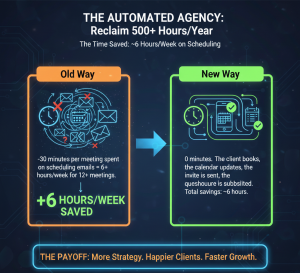
The Time Saved:

  • Old Way: ~30 minutes per meeting spent on scheduling emails = 6+ hours/week for 12+ meetings.
  • New Way: 0 minutes. The client books, the calendar updates, the invite is sent, the questionnaire is submitted. Total savings: ~6 hours.
Comparison chart titled "The Time Saved" showing the old way of manual emails versus the new automated booking way.

The goal isn’t just to save time; it’s to eliminate the task entirely.

Part 2: Automating the Reporting Grind (Saves ~4+ Hours/Week)

Monthly reporting was a soul-crushing, copy-paste marathon from 8 different platforms into a PowerPoint. No longer.

Our Core Stack:

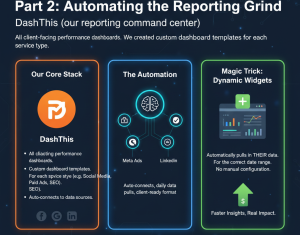
DashThis (our reporting command center)

    • What we use it for: All client-facing performance dashboards.
    • The Automation: We created custom dashboard templates for each service type (e.g., Social Media Management, Paid Ads, SEO). DashThis auto-connects to our data sources (Meta Ads, Google Analytics, LinkedIn, etc.), pulls in the data daily, and displays it in a beautiful, client-ready format.
    • Magic Trick: We use Dynamic Widgets. When we add a new client to a template, it automatically pulls in their data for the correct date range. No manual configuration.
Infographic detailing DashThis automation, showing dynamic widgets and daily data pulls from Meta Ads and LinkedIn.

Customize at scale and eliminate manual setup with dynamic reporting widgets.

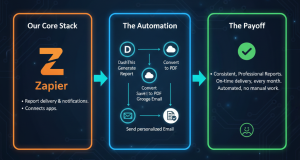
Zapier (the glue)

    • What we use it for: Report delivery and notifications.
    • The Automation: We have a “Zap” that: On the 3rd of each month, triggers DashThis to generate the latest report for Client X > Converts it to a PDF > Saves it to a dedicated Google Drive folder > And then sends a personalized email via Gmail to the client with the PDF link and 2-3 key insights pulled from the dashboard.
    • The client receives a consistent, professional report on the same day every month, and we don’t lift a finger.
Comparison chart titled "The Time Saved" showing the old way of manual emails versus the new automated booking way.

The goal isn’t just to save time; it’s to eliminate the task entirely.

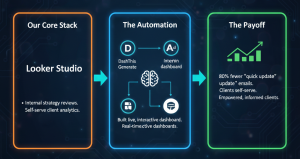
Google Data Studio / Looker Studio (for deep-dive analytics)

    • What we use it for: Internal strategy reviews and clients who love to self-serve.
    • The Automation: We built a live, interactive dashboard that updates in real-time. Clients with logins can check KPIs anytime. This has reduced the “Can I get a quick update?” emails by about 80%.
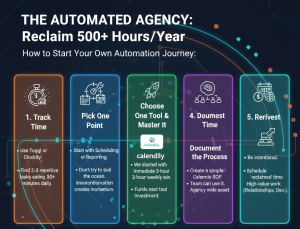
A 5-step roadmap for agency automation: Track Time, Pick One Point, Choose One Tool, Document the Process, and Reinvest.

Automation doesn’t happen overnight; it starts with tracking your time and picking one small win.

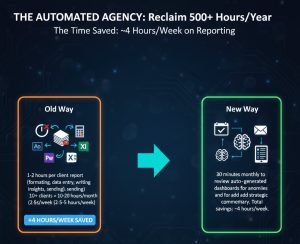
The Time Saved:

  • Old Way: 1-2 hours per client report (formatting, data entry, writing insights, sending) x 10+ clients = 10-20 hours/month (2.5-5 hours/week).
  • New Way: 30 minutes monthly to review auto-generated dashboards for anomalies and add strategic commentary. Total savings: ~4 hours/week.
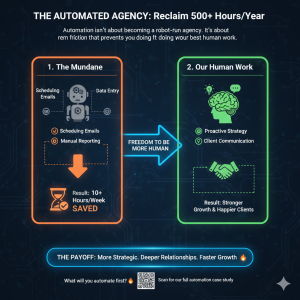
Diagram showing the transition from "The Mundane" (scheduling and data entry) to "Human Work" (proactive strategy and client communication).

Remove the friction of mundane tasks to focus on the strategic work only humans can do.

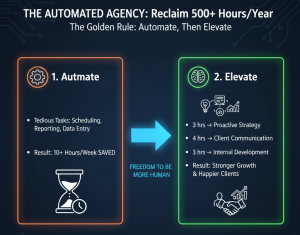
The Golden Rule: Automate, Then Elevate

Automation isn’t about replacing human touch; it’s about freeing us to be more human. The 10+ hours we save weekly are now strategically reinvested:

  • 3 hours → Proactive Strategy: We now hold monthly “innovation hours” for each client to brainstorm new opportunities, rather than just reporting on the past.
  • 4 hours → Client Communication: More check-in calls, voice notes, and strategic emails that build the relationship, not just transact.
  • 3 hours → Internal Development: Improving our processes, learning new platforms, and team training.
Infographic split between "Automate" (tedious tasks) and "Elevate" (strategy, communication, and development).

The goal of saving 10 hours a week isn’t just to work less—it’s to do better work

How to Start Your Own Automation Journey:

  1. Track Your Time for One Week: Use Toggl or Clockify. You’ll likely find 2-3 repetitive tasks eating 30+ minutes daily.
  2. Pick One Pain Point: Start with either scheduling or reporting. Don’t try to boil the ocean. Mastering one automation creates momentum.
  3. Choose One Tool and Master It: We started with Calendly. It gave us an immediate 3-hour weekly win that funded our next tool investment.
  4. Document the Process: Once it works, create a simple SOP so your team can use it. This turns your personal time-saver into an agency-wide asset.
  5. Reinvest the Time, Don’t Just Bank It: Be intentional. Schedule the “reclaimed” time in your calendar for high-value work before it gets filled by other low-value tasks.
Diagram showing the transition from "The Mundane" (scheduling and data entry) to "Human Work" (proactive strategy and client communication).

Remove the friction of mundane tasks to focus on the strategic work only humans can do.

Automation isn’t about becoming a robot-run agency. It’s about removing the friction that prevents you from doing your best, most human work. By letting machines handle the mundane, we’ve not only saved 10+ hours a week—we’ve become a better, more strategic, and more responsive partner to our clients.

A 5-step roadmap for agency automation: Track Time, Pick One Point, Choose One Tool, Document the Process, and Reinvest.

Automation doesn’t happen overnight; it starts with tracking your time and picking one small win.

The tools are out there. The time is now. What will you automate first?

Curious about a specific setup? Have a tool that saves you hours? Share it below—let’s build the automated agency playbook together.